
Why Agencies Choose QueryGuard Over Claude, ChatGPT & LLMs for Negative Keywords
 Trevor NortonOctober 3, 2026

LLMs are great when you ask them. QueryGuard is the negative keyword tool that watches your Google and Bing Ads accounts every night and tells the whole team when money leaks. Most teams end up using both.
What Claude and ChatGPT do well for negative keywords
Reviewing a search terms report you paste in
Explaining match types and brainstorming negatives
Where a DIY LLM workflow breaks down
It only runs when someone remembers to run it
Setup takes real work (exports, prompts, scripts, scheduling)
One person becomes the single point of failure
What QueryGuard gives you out of the box
Slack and email alerts in a few clicks, with no custom setup and no vibe coding
The whole team sees it, not just one person, so clients know more than one set of eyes is on wasted spend
A clean dashboard of negative keywords and potential wasted spend over time
One-click negative exclusions
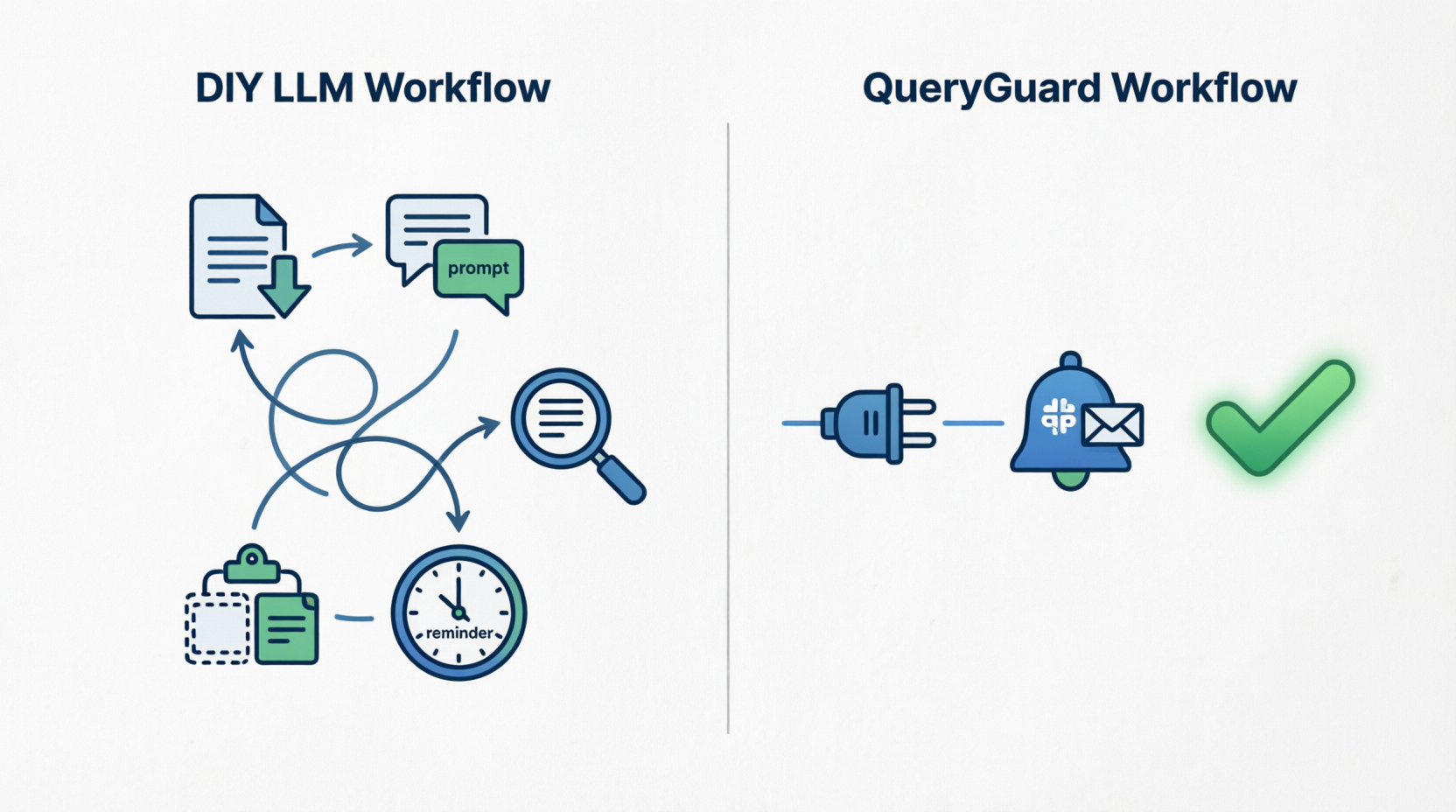
DIY LLM workflow vs QueryGuard
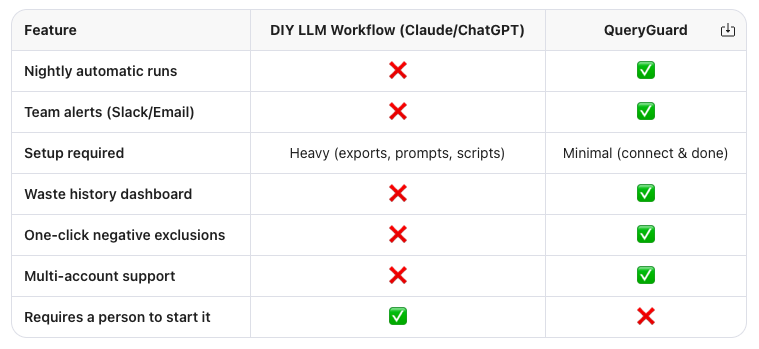
Why Agencies Choose QueryGuard over LLMs alone
When I started my career in digital marketing I worked for an ad agency in Philadelphia. At the time we had a massive banking client and 21 Savage just released his viral hit single "Bank account".
Great for 21 Savage. Not so great for my agency.
The Google Search ads account ended up spending close to $250k on 21 Savage related bank account terms. Turns out the client wasn't happy. And this was the inspiration for QueryGuard. A tool that has your back 24/7 to avoid a situation like this from ever occurring again.
QueryGuard provides immediate coverage for:
Whenever the account manager overseeing the Google or Bing accounts is on vacation. Now that team has peace of mind knowing there's no anomolous spending on a viral term.
Ensures every client has oversight, not just the ones where an AM is on top of things.
A few other added benefits:
Client-facing proof: the dashboard shows negatives added and potential waste over time, which helps retention.
Fewer make-goods, since junk queries get caught before the monthly review or things get out of control.
No internal tool to build, secure and maintain, so no scripts and no prompt library drafting.
Faster onboarding for new accounts as you connect you immediately get recommendations to drive instant cost savings.
Use both: connect Claude or ChatGPT to QueryGuard
QueryGuard does the nightly watch and alerts, and your LLM handles deeper questions.
We hear all the time from agencies how they've connected QG to their LLM of choice for deeper analysis into trends to drive value for their clients while QG helps automate this process.
Not only does it provide costs savings to ad accounts but it also helps save your AMs time and mental space.
When an LLM is enough
If you're an internal team managing one Google ad account with spend less than $10k per month it might not make sense for you to use QueryGuard.
Would it provide value? Sure.
But one account spending less than $10k per month does not generate enough search terms where things are not manageable for a human to manually review the search terms report.
And in those instances we'd recommend you try the free version of our tool or simply download CSVs and upload them to your LLM once a month.
QueryGuard is a bit more tailored to larger spend accounts, agencies managing tons of accounts or a freelancer overseeing multiple accounts.
Interested in trying QueryGuard for yourself?
We offer a free version of the tool if you'd like to get a better sense of functionality and what the dashboard looks like. The free version does not support connecting to accounts and pushing negative keywords live but we think gives teams a great start.