
Auto-Upgraded to AI Max? Check Your Search Terms This Week
 Trevor NortonOctober 13, 2026google adsAI MaxNegative Keywordsppcmicrosoft ads
If your Google Ads Search campaigns used campaign-level broad match or automatically created assets, Google likely switched them to AI Max in the September 2026 auto-upgrade. That means wider search term matching you may not have chosen. This week, check your search terms, add negative keywords for junk themes, and set up daily monitoring. QueryGuard, the negative keyword tool for Google and Bing (Microsoft) Ads, handles the monitoring part.
Last updated: October 2026
Was my campaign upgraded?
Did it use the campaign-level broad match setting?
Did it use automatically created assets (now called text customization)?
Did you see an AI Max upgrade notification in Google Ads?
If yes to any, keep reading. Dynamic Search Ads campaigns haven't moved yet. That upgrade is scheduled for February 2027.
What Google changed in September
According to Google's announcement (April 2026, updated June 2026), legacy Search settings are being folded into AI Max. AI Max is a set of targeting and creative features that runs inside your existing Search campaigns. It isn't a new campaign type.
Which campaigns were upgraded automatically
Campaigns using the campaign-level broad match setting
Campaigns using automatically created assets (ACA)
Google's developer blog says the migration started September 1 and rolled out gradually through the month. Google expected eligible upgrades to finish by the end of September and said advertisers would get in-account notifications first.
What's turned on after the upgrade
Google set up each upgraded campaign to mirror what it had before:
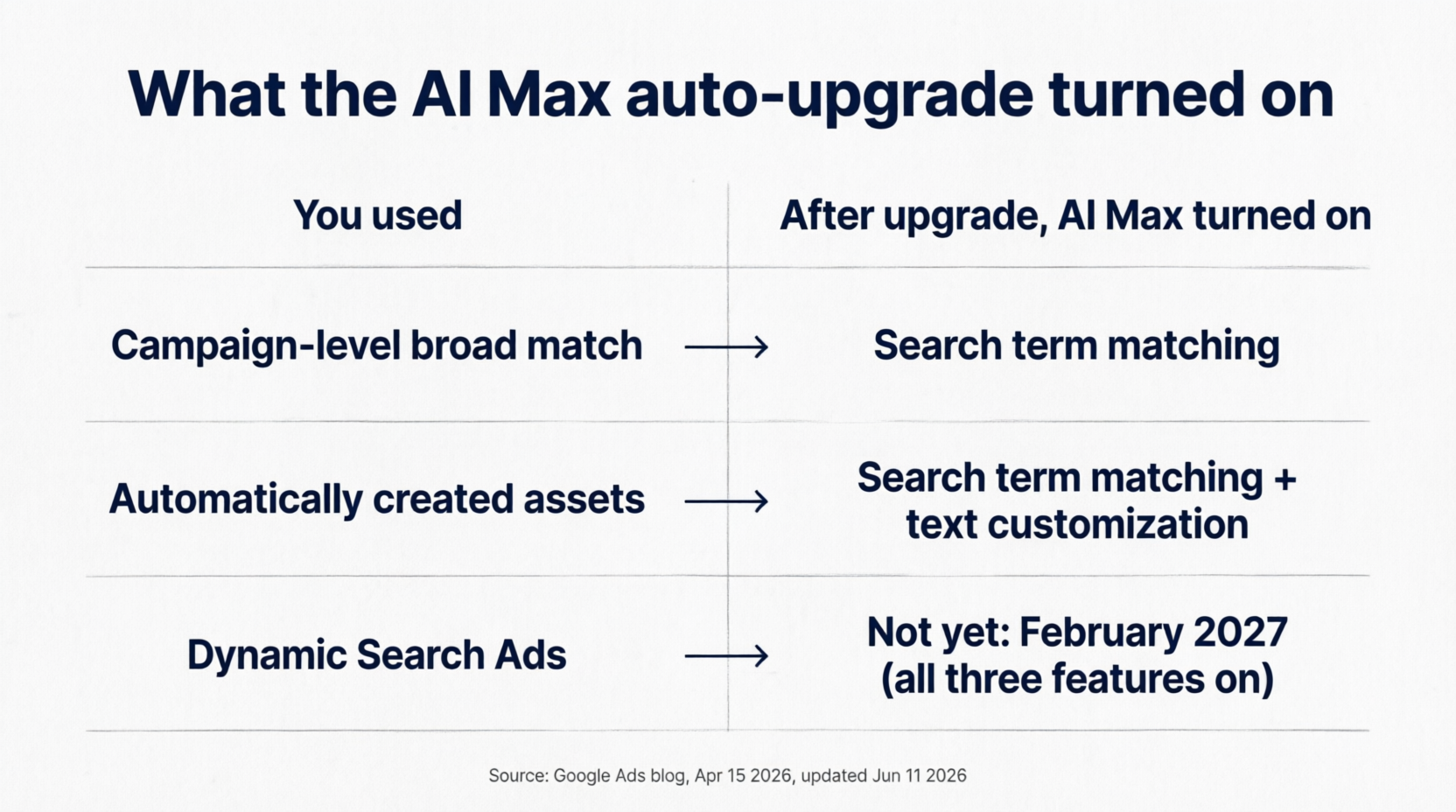
Campaign-level broad match campaigns: AI Max with search term matching on. Existing brand inclusions and exclusions carry over.
ACA campaigns: AI Max with search term matching and text customization on.
In both cases, final URL expansion stays off. Search term matching is the part that affects your queries. Google describes it as broad match plus "keywordless" matching based on your assets and landing pages.
What's not changing yet (Dynamic Search Ads move in February 2027)
Google moved the DSA sunset and auto-upgrade to February 2027. When DSA campaigns move, all three AI Max features (search term matching, text customization, and final URL expansion) will be turned on, and existing URL controls will be kept.
Why your search terms need a check right now
Wider matching isn't bad by default; Google built AI Max to find relevant queries your keywords miss. But an unchosen change deserves a look:
More varied queries. Search term matching goes beyond your keyword list. Some of those queries will be great and some won't.
Nobody is watching it. If nobody opted in, nobody has set aside time to review the new traffic.
Spend can shift before your monthly review. A new junk theme can run for weeks before anyone opens the report.
Client questions. Agencies should explain odd queries or ad text before clients ask.
To be fair to Google: its reporting guide recommends waiting at least 2 weeks after AI Max is turned on before adding negatives, so the system can learn. September upgrades are past that window. Still, judge borderline queries on conversion data.
Your quick post-upgrade search terms check
Run this once per account this week. After that, repeat steps 2 to 6 regularly.
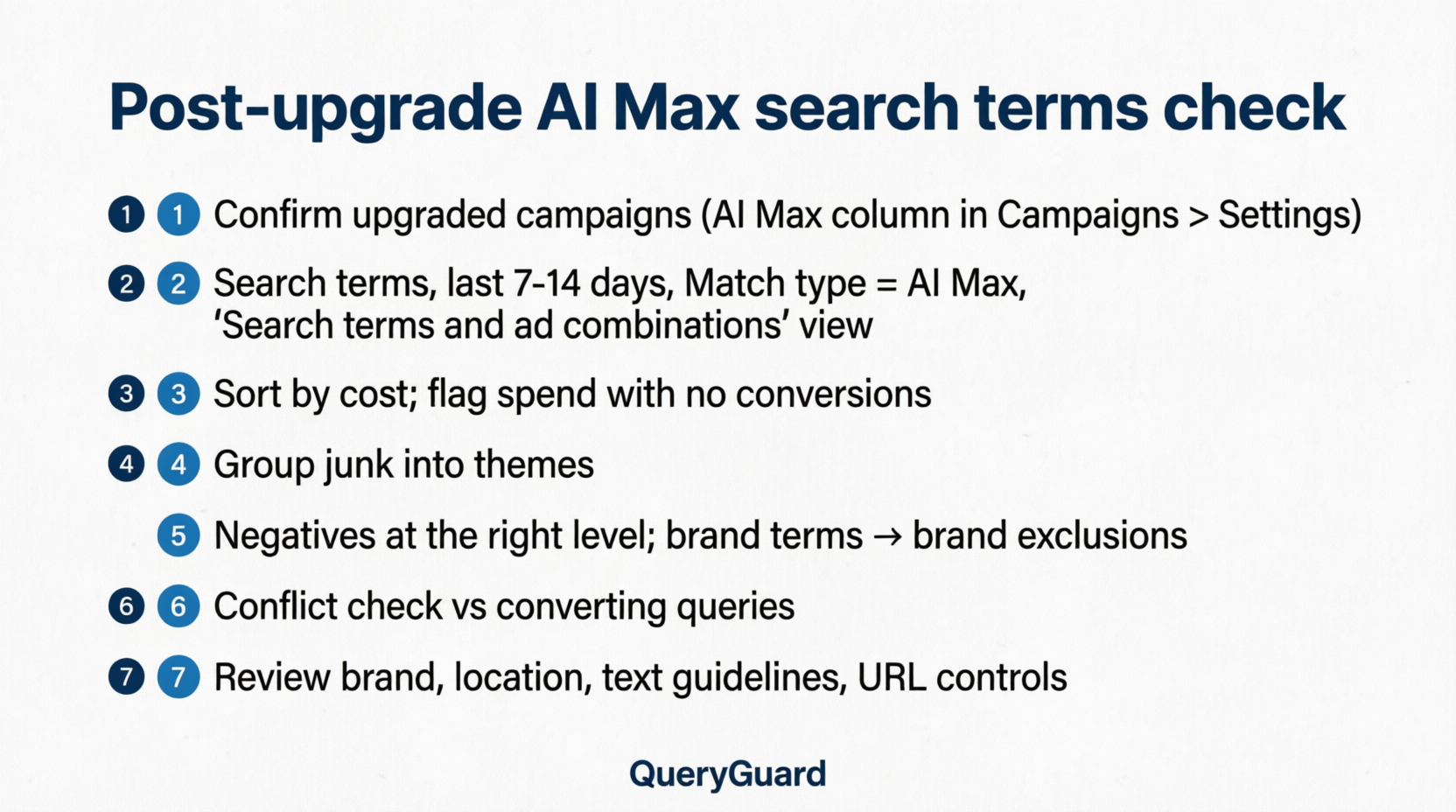
1. Confirm which campaigns were upgraded
Go to Campaigns > Settings. Google says AI Max settings can be filtered or added as columns in the campaign list.
Open a campaign, select AI Max, and note which features are on. Also check your account notifications.
API users: Google's developer blog lists the campaign fields
aca_migration_date_timeandbroad_match_migration_date_time. A date in either field means the campaign was migrated.
2. Open the search terms view for the last 7 to 14 days
Open the search terms report for the last 7 to 14 days.
Add the Source column and filter Match type for "AI Max." Google notes that this filter leaves out "Other search terms," so the totals may look low.
From the Search terms dropdown, choose "Search terms and ad combinations." This view was renamed in September from "Search terms and landing pages from AI Max." It shows each query with the headlines and landing pages that served.
3. Sort by cost and look for spend with no conversions
Sort by Cost, high to low. Flag terms with real spend and zero conversions or well-below-target results. Terms with only a few clicks: note them and recheck next week.
4. Group junk queries into themes
Group bad queries into themes so one negative blocks the whole pattern:
Jobs: careers, hiring, salary
Free: free, template, sample
DIY: how to, tutorial
Wrong product or wrong location
Competitors you don't want
5. Add negatives at the right level; use brand exclusions for brand terms
Google's AI Max FAQ confirms negative keywords are still respected with AI Max on.
From the report, check a row and choose Add as negative keyword. For a bad landing page, choose Add as negative URL.
Put themes that apply everywhere in an account-level or shared list. Keep campaign-specific themes at the campaign level.
Negatives don't match close variants, so add synonyms and singular or plural forms yourself.
Brand terms: Google's negative keyword guidance recommends brand exclusions over negatives, because they also catch misspellings and variants. In AI Max, brand exclusions are a campaign-level setting. Brand lists live under Tools > Shared library > Brand lists.
6. Check you didn't block converting queries (conflict check)
Before you save, compare each new negative against queries that converted in the last 30 to 90 days. A broad "free" negative can also block "free shipping." If you find a conflict, use phrase or exact match instead.
7. Review AI Max controls: brand, location, text guidelines, URL settings
Brand inclusions and exclusions: control which brands your ads show alongside.
Locations of interest: steer location intent at the ad group level.
Text guidelines: if text customization is on, list terms and messages the AI-written text should avoid.
URL inclusions and exclusions: these apply if you turn on final URL expansion.
Search term matching per ad group: turn it off where tight matching matters most.
Red flags to look for in AI Max search terms
These are illustrative examples for a fictional commercial roofing company. They are not client data.
Queries that only loosely match your product. Illustrative: "roof rack for car"
Informational queries with no buying intent. Illustrative: "what is a flat roof made of"
Wrong-location or wrong-service queries. Illustrative: "residential roof repair [city you don't serve]"
Competitor or brand terms you didn't intend to bid on. Illustrative: "[competitor name] roofing reviews"
Ad text that doesn't match the query, a possible side effect of text customization. Check the headlines in "Search terms and ad combinations." Illustrative: a "24/7 emergency service" headline on "how long does a commercial roof last"
Should you turn AI Max off?
You can, but weigh both sides first.
Google reports that AI Max for Search campaigns see an average of 7% more conversions or conversion value at a similar CPA/ROAS when using the full feature suite, compared with search term matching alone. That figure is Google's internal data (2026, non-Retail advertisers). It isn't ours, and your account may differ.
Know what turning it off does:
It disables every AI Max feature, including brand exclusions set in AI Max. URL inclusions and exclusions are ignored.
If you turn it back on, your previous settings come back.
There's no going back to the old setup. Google has blocked creating new campaign-level broad match or legacy ACA settings since August 2026.
Reasons to keep it and add guardrails
Your check showed mostly relevant queries.
Conversions and CPA/ROAS have held up since the upgrade.
You use conversion-based Smart Bidding. Google says search term matching doesn't work with Manual CPC.
You can keep negatives, brand settings, and URL controls up to date.
Reasons to test it with an experiment before keeping it
Spend is moving toward themes you don't want, even after you added negatives.
Your conversion tracking isn't reliable enough to judge the new traffic.
You need tight control over messaging. For example, pinned assets aren't respected when final URL expansion is on.
Google offers one-click AI Max experiments, a 50/50 split against your base campaign, in eligible accounts.
Agencies: run this check across every client account
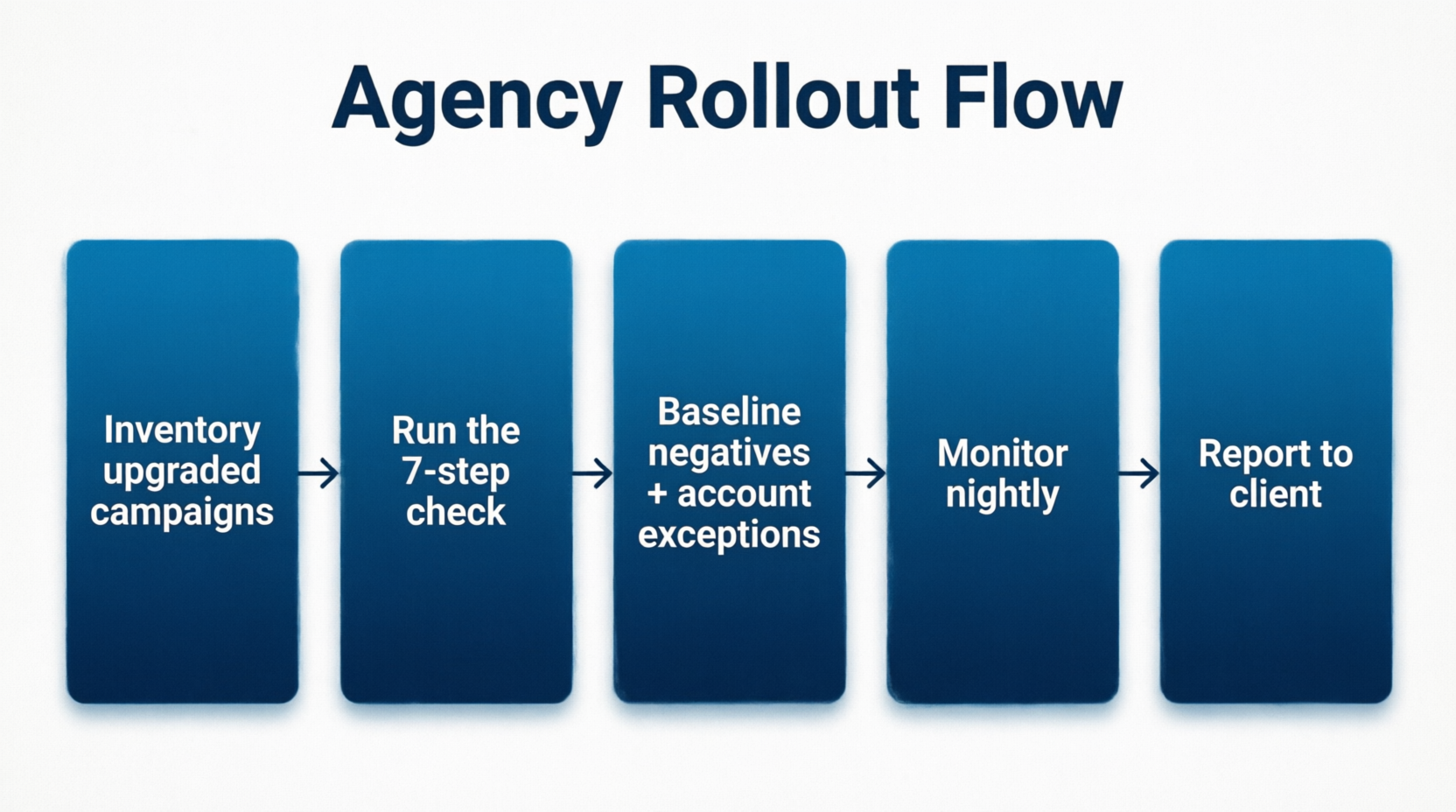
Make a list of upgraded client campaigns. Use the AI Max column, or the API migration fields at MCC scale.
Set a standard negative baseline for each vertical, then add account-specific exceptions.
Tell clients first. Cover what Google changed, what you checked, and what you blocked.
Send alerts to the team channel, not one AM's inbox.
Keep watching after this week with QueryGuard
One check covers this week; search terms keep changing. QueryGuard is a negative keyword tool for Google and Bing (Microsoft) Ads:
Nightly checks: anomaly detection runs on every connected account and flags search terms that spend without converting.
Team alerts: in Slack or email.
One-click negatives: review a flagged term, then write it back to Google Ads as a campaign-level negative, or mark it as fine or snooze it.
Dashboard: track your negatives and potential wasted spend over time.
CSV upload: upload a search terms export if you'd rather not connect an account yet.
Plans are about \(50/month for in-house teams and about \)99/month for Pro (multiple accounts). See pricing.
FAQ
Did Google automatically switch my campaigns to AI Max?
If a Search campaign used campaign-level broad match or automatically created assets, Google began upgrading it to AI Max in September 2026 and expected to finish by the end of the month. To confirm, add the AI Max column under Campaigns > Settings.
When will Dynamic Search Ads move to AI Max?
Google moved the DSA auto-upgrade to February 2027. When it happens, dynamic ad groups become standard ad groups, all three AI Max features are turned on, and existing URL controls are kept. You can also upgrade earlier yourself.
Where do I find AI Max search terms?
In the search terms report, add the Source column and filter Match type for "AI Max." To see headlines and landing pages for each query, choose "Search terms and ad combinations" from the Search terms dropdown. That view used to be called "Search terms and landing pages from AI Max."
Do negative keywords work with AI Max?
Yes. Google says negative keywords are respected with AI Max on. For brand terms, Google recommends brand exclusions instead. It also suggests waiting about 2 weeks after turning AI Max on before adding negatives.
Can I turn AI Max off after the auto-upgrade?
Yes. Go to Campaigns > Settings, select the campaign, open AI Max, and switch it off. This disables every AI Max feature, including brand exclusions set in AI Max. You can't return to the legacy broad match or ACA settings.
Catch AI Max waste before your next client review
This week's check finds today's problems; monitoring catches the next ones. QueryGuard watches your Google and Bing Ads search terms every night, alerts your whole team when spend leaks, and lets you block it in one click. Start free or compare plans.
Keep reading:
Turning on AI Max on purpose? Read AI Max for Search: Build Your Negative Keywords Before You Turn It On.
Already reviewing search terms with an LLM? See Why Agencies Choose QueryGuard Over Claude, ChatGPT & LLMs for Negative Keywords.